LOBRIGO


An Inventory Management App
Shopnote
ABOUT THE CLIENT
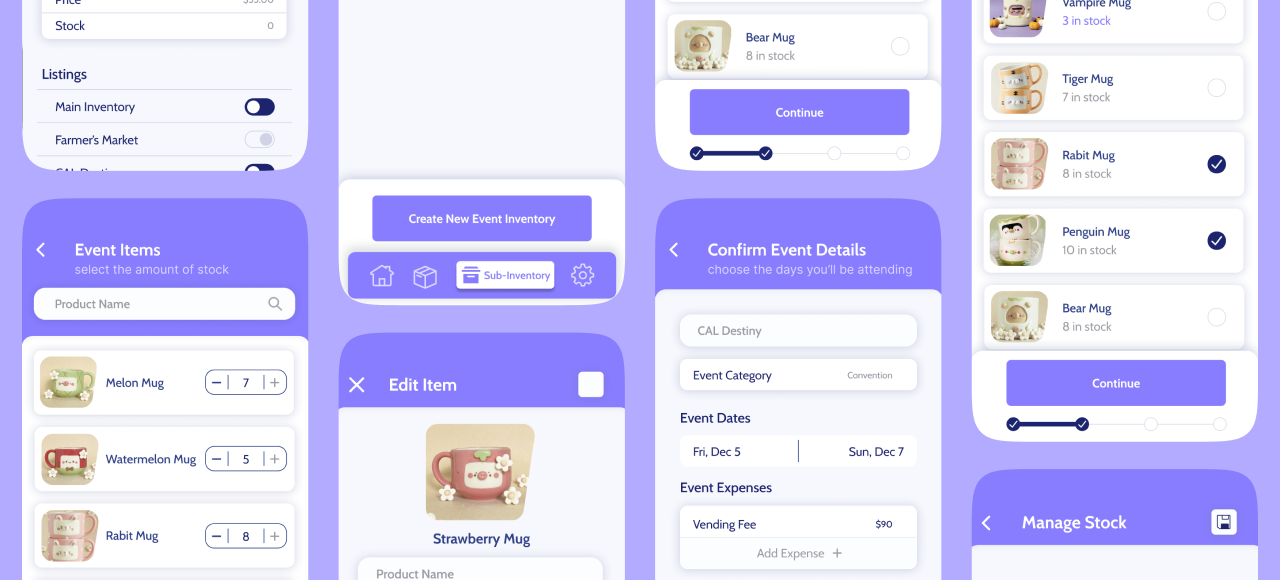
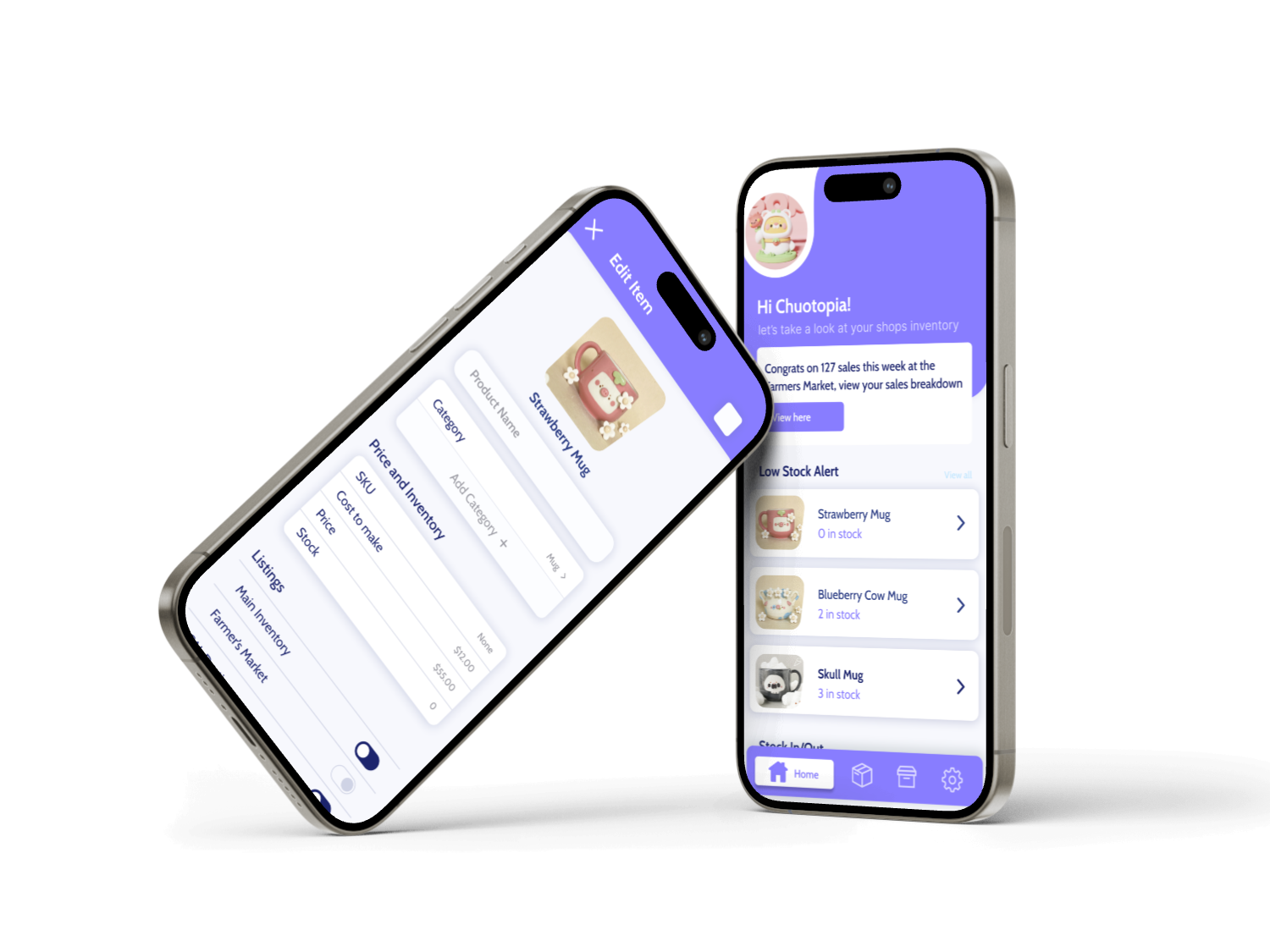
Shopnote is an application around micro business, where users have the ability to stay on top of their inventory whether they are selling in person or at an event. Users can have central inventories for all of the items and then go on to create separate inventories for each specific event or platform where users sell online that all pulls from their main inventory. The platform allows users to keep up with finances with each individual product and create financial goals through their inventories.
INDUSTRY
Retail
SERVICES
Preliminary Research
UX Designer
Asset Gathering
Keeping track of all your inventory across
multiple platforms.
For micro businesses owners it can be difficult to keep track of where you’re selling what where. My goal was to simplify the chore of keeping shop owners inventory up to date.
This idea came from my
own struggle
When I started my research I looked into the challenges that I and those in my own community faced. When I first started I was more so focused on how to drive sales through inventory, but realized inventory itself was an issue for micro businesses.
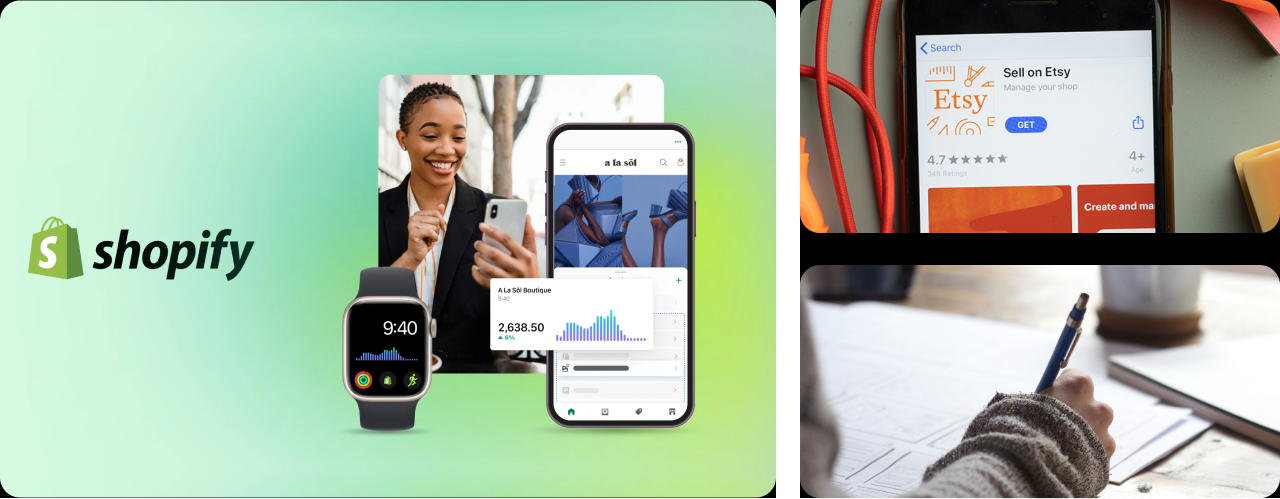
Digging deeper into the problem I realized
That there were a few different experiences that these business owners faced, I decided that the biggest division between the experiences came down to those who sold exclusively at in person events and those who had online shops and sold in person.
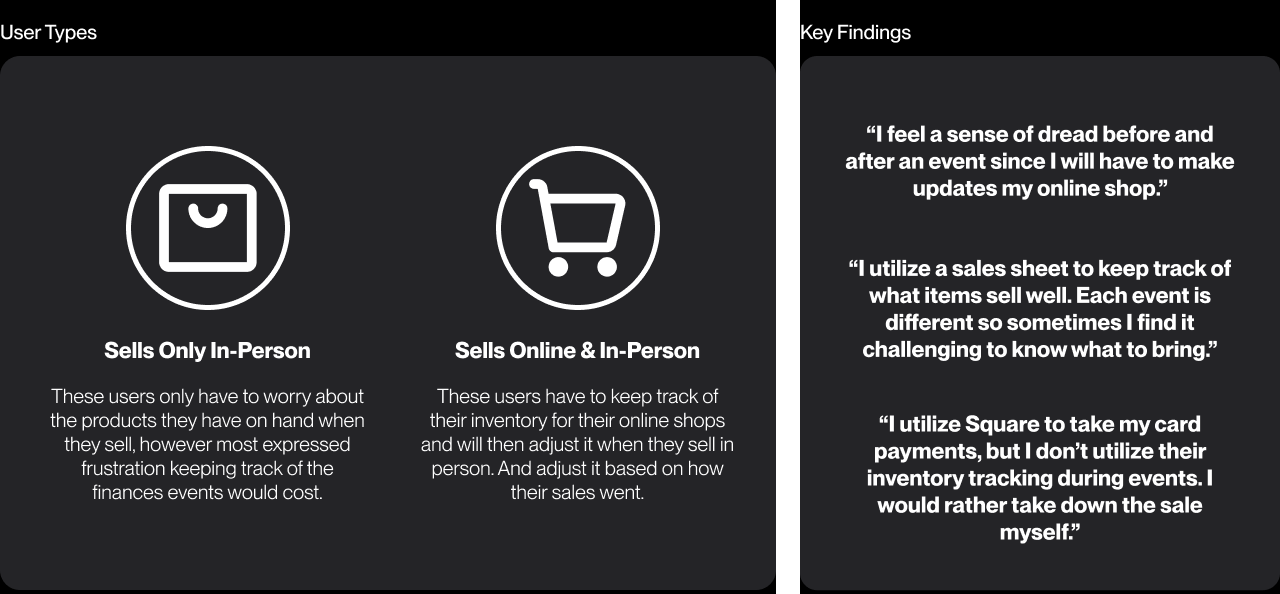
GOAL
Improve the experience of keeping track of micro business’s inventory by making it easier to manage
Develop an essential product for mirco shop owners who both sell in person and online. The goal is to make the task of inventory keeping easier and as a way for users to see at a glance what products do well. Also creating a way for users to be able to see their expenses for their inventory and the expenses for when they sell in person.
How might we...
How might we create a more seamless experience for inventory tracking across
multiple platforms.
How might we make users feel less stressed about their finances when preparing for and event?
How might we take an analytical approach to how users sell what items in the future.

1
2
3
RESEARCH
“Is there an inventory tracking application out there that focuses around micro
shop owners?”
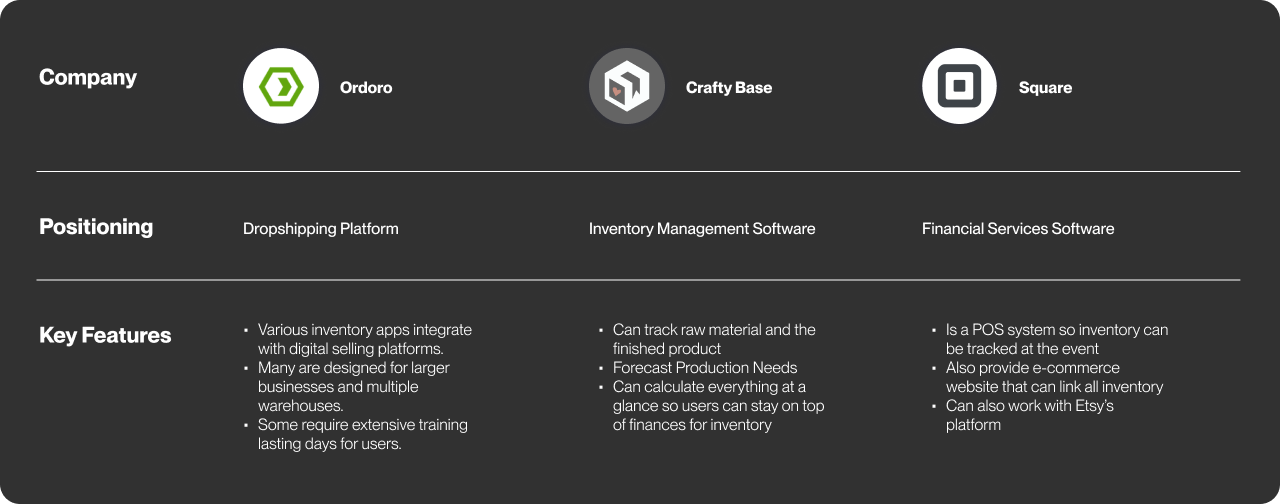
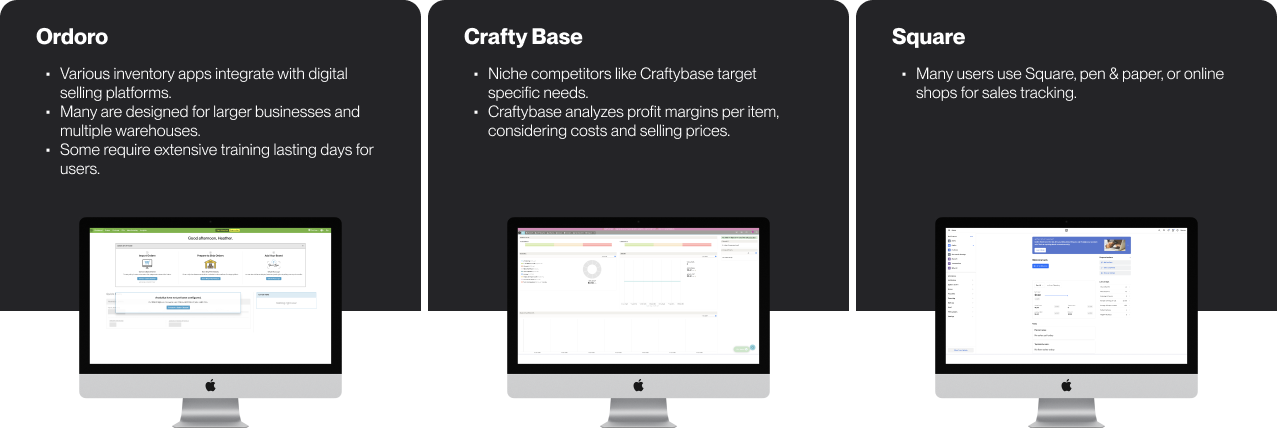
The goal of my capstone project was to create an application that was something new. There were already a multitude of inventory application products out the, but a majority of those focused larger shops. Rather than the shop owners who were creating their own stock and having trouble keeping track of it, which was my target.
User Type: Sells In-Person & Online
User Type: Sells In-Person & Online


Putting together event inventory
Selling at the event
Update their website
User go through their inventory and choose what products to bring with them
Create a separate inventory list of each product they brought with them and input the inventory amounts into Square
Users will then manually go on to their selling platform they use to take away the stock they are bringing to the event or close their shop for a certain time period
It can be a lot of manual work to update stock
There are too many platforms where they need to manage they're stock
If they mess up on their digital platform they could possibly sell an item that they no longer have after selling all available stock in person
Lessen the amount of manual work
Integrate different selling platforms
Allow them to input the information during the event or afterwards, in a way that isn't as time intensive
Analyze the data from the sales day where the application can make recommendations of products to bring in the future
Create an event inventory, keep track of sales during the sales day, and at the end of the event allow the application to do all of the math for the total inventory
Biggest issue is keeping track of what sold while staying on top of sales at their table.
Users have to do a good chunk of math which can lead to human error
A lot of manual work to put in all the information
If the sale is digital they will utilize Square to take a card payment and will select Square listing to keep track of digital sales
If the payment is cash they will make a note of the total sale and what products sold
Review their sales in Square and their cash sales sheet.
Do math on their event inventory minus what had sold at the event. Then add that total back to there shop inventory
Update their website with their new inventory totals
What’s going on
Frustrations
Oppurtunities
User Type: Sells Only In-Person
User Type: Sells Only In-Person
Putting together event inventory
Selling at the event
Update their website
User go through their inventory and choose what products to bring with them
Create a seperate inventory list of each product they brought with them
It can be hard to keep track of where users are putting this information
There’s no centralized place for users to keep track of these lists
Lessen the amount of manual work
Allow for a centralized information hub on all of their inventory
Allow them to input the information during the event or afterwards, in a way that isn't as time intensive
Analyze the data from the sales day where the application can make recommendations of products to bring in the future
Create an event inventory, keep track of sales during the sales day, and at the end of the event allow the application to do all of the math for the total inventory
Biggest issue is keeping track of what sold while staying on top of sales at their table.
Users have to do a good chunk of math which can lead to human error
A lot of manual work to put in all the information
Users keep track of cash and digital sales by making a note of the total sale and what products sold
Review their sales in their notes, by inputing all of their information in a google sheets document
Do math on their event inventory minus what had sold at the event. Then add that total back to there shop inventory
What’s going on
Frustrations
Oppurtunities
MAIN FEATURES
& STRUCTURE
Site Map
The main focus when creating the site map was figuring out how the multiple inventories would be placed in the app and their functionality.

Onboarding
Home Page
Inventory
Sub-Inventory
Profile

Log In
Active
Add Event Inventory
Add Items
Shop Details
Manage Inventory
Settings
Sync With Main Inventory
Keep Track of Sales
Upcoming
Event Date
Edit Event
Event Expenses
Create Inventory
Event Details (location, type)
Past
Sign Up







Wireframes
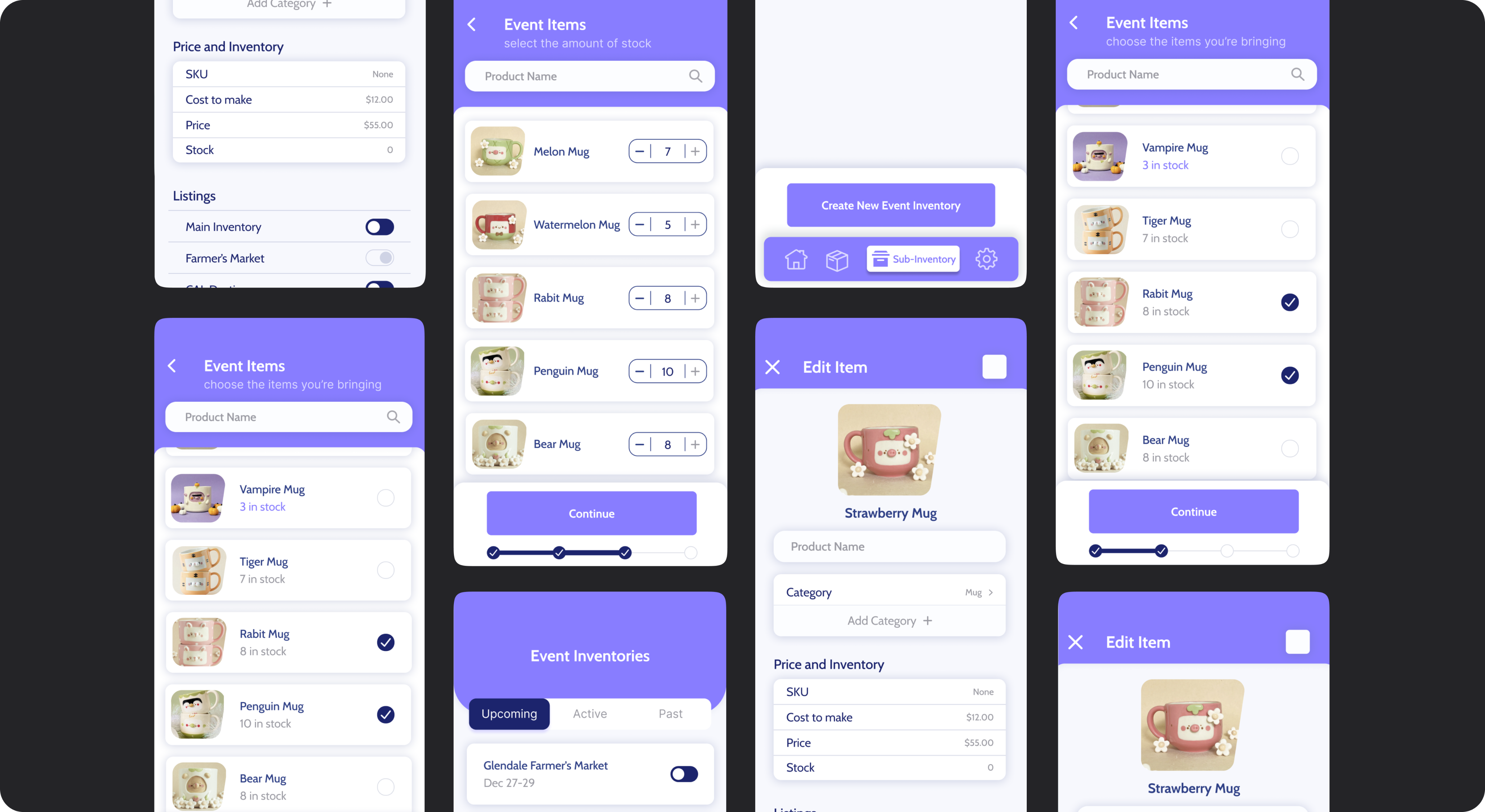
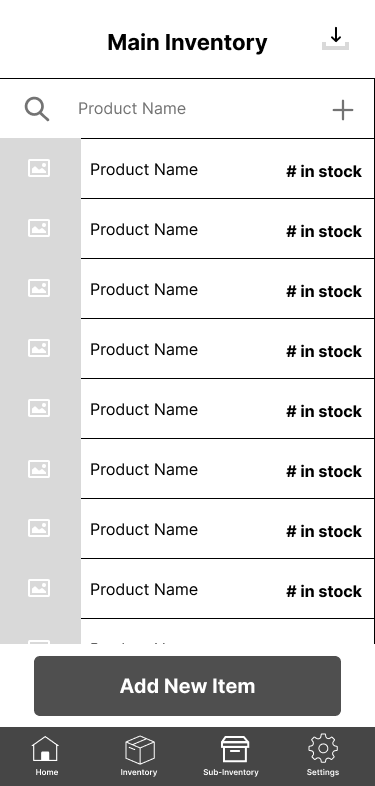
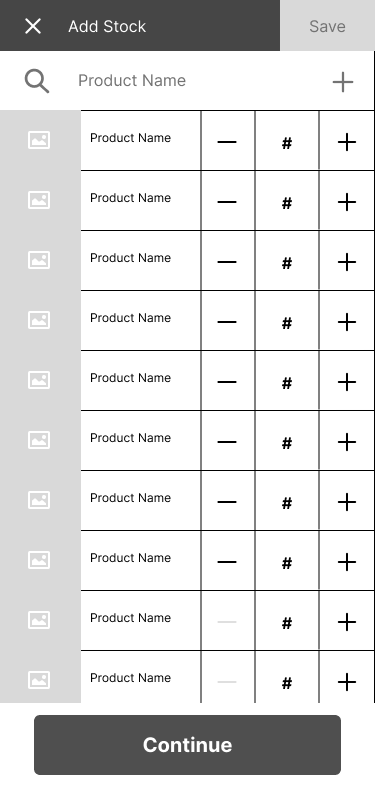
In the wireframes I wanted to make sure that I was improving the experience of inventory management, I wanted to make it as painless as possible while minimizing the time the user would have to go through when keeping up with what they had in stock.
Keep Track of Inventory
Search through products with ease
Add stock to your inventory
create new items
View how much stock you have of each item
Add new stock inventory of multiple items at once


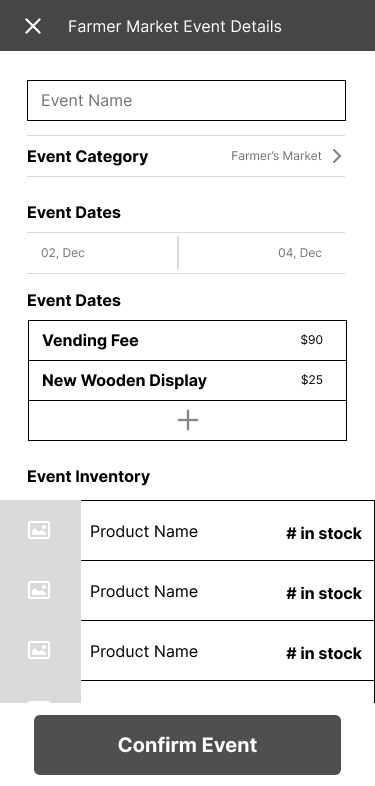
Create Event Based Inventories
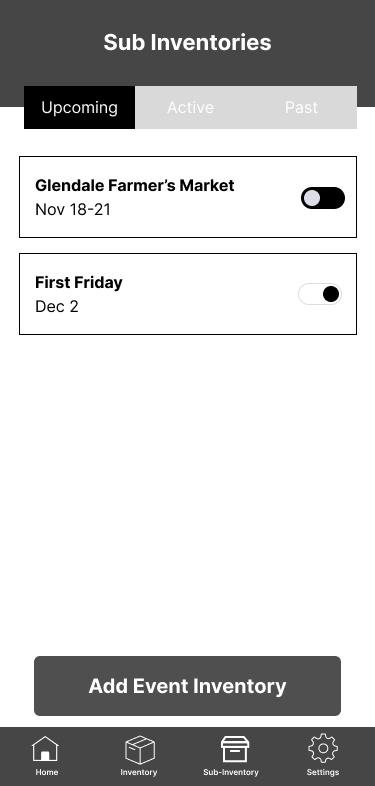
Turn on an event inventory to have it take from the main inventory
See future, present, and past events; each having different features
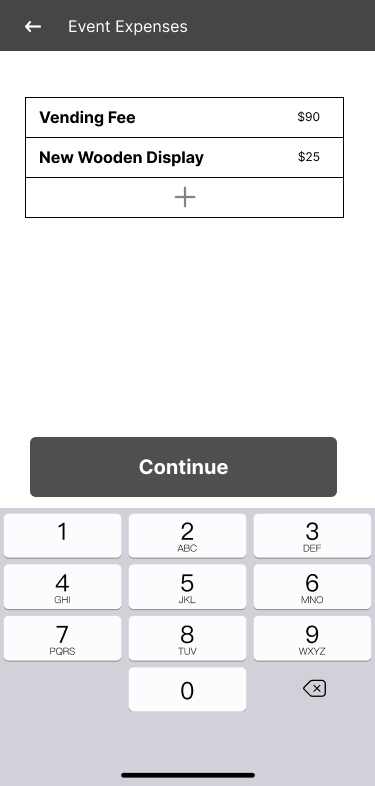
Include event expenses to see profit margins from
the event
Confirm the event details



Keep Track of Inventory During the Event
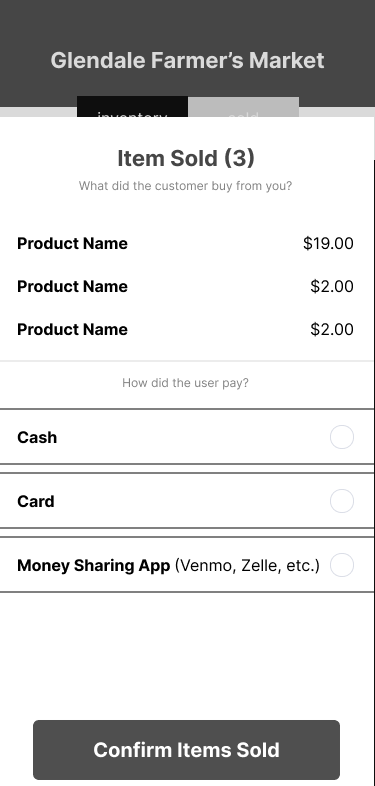
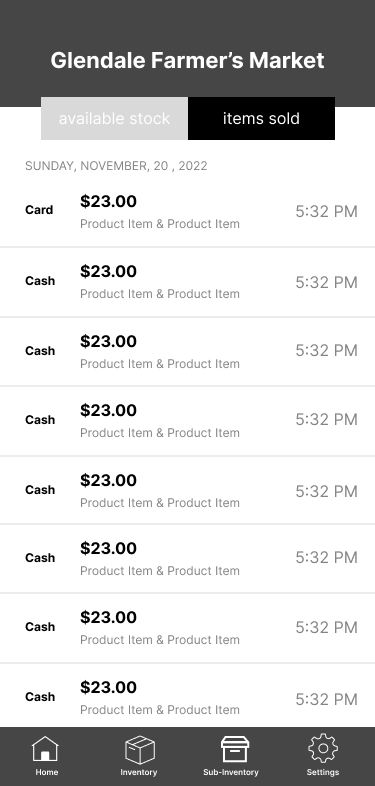
Users can switch between their stock and their items that have been sold
Users choose how payment was taken
Users choose the items that have been sold from previous transactions
Users can see transactions that take place during
the event


Multiple Ways to Add Stock

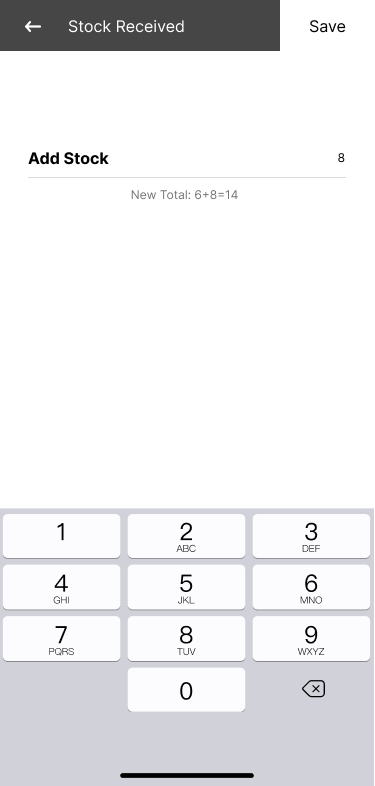
Add new stock inventory of for individual items
Include cost to make and price to see profit margins
Add categories to items to get a better break down
Add in a title and image for each product
Include the item in different event inventories



Task Based User Testing
When the wireframes were sufficient for testing, I found different participants that fit the criteria of my two user types and held the session over Zoom. Given the time constraints I tested 3 users, where I gave them a brief overview of the project, gave them three tasks they would have to complete, and at the end asked them for their final thoughts.
With the user feedback I was able to go back and make iterations that can be seen in
the prototype.
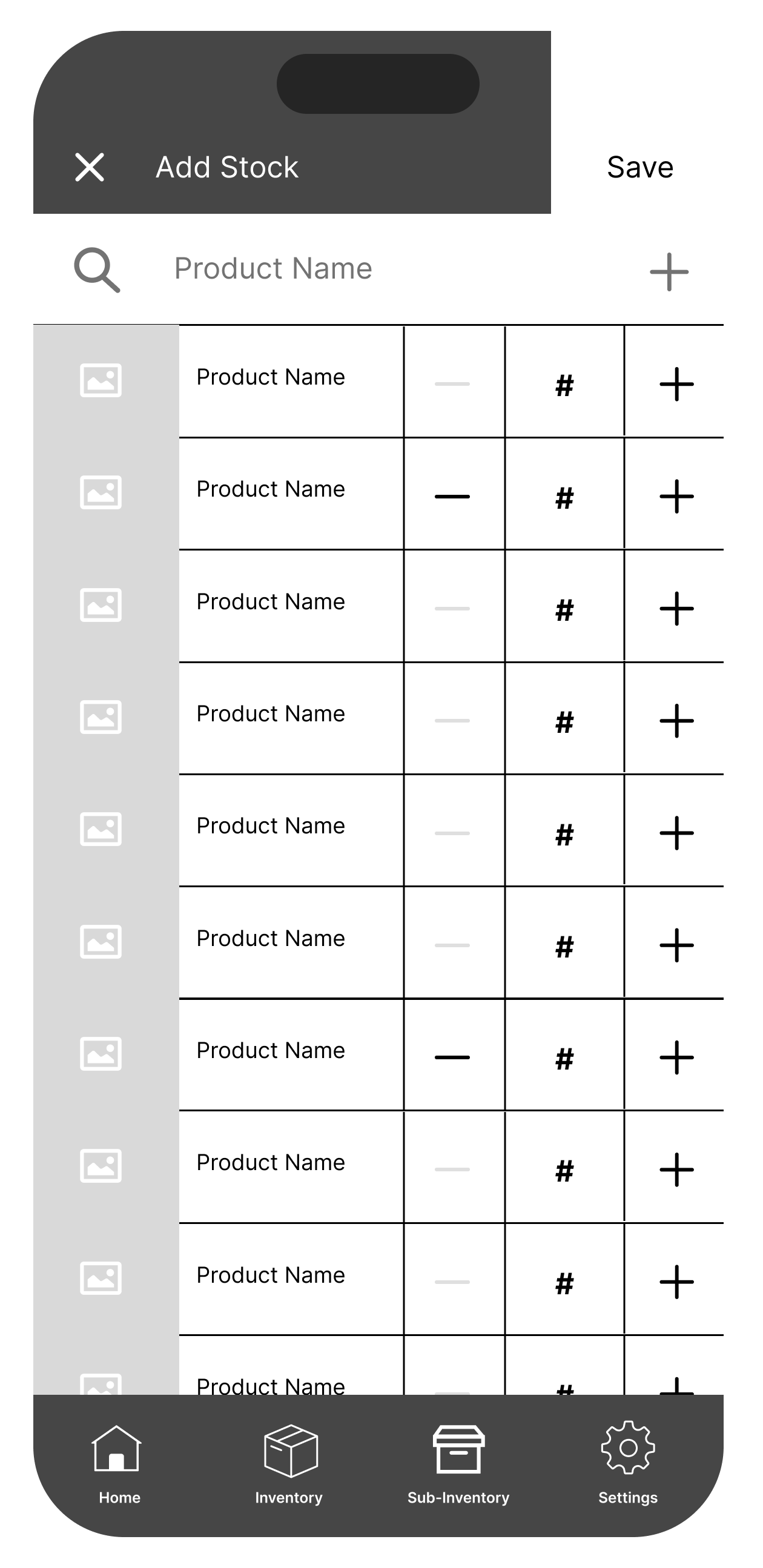
For the first scenario users had to go through the app and find item that their shop was low in stock of and increase their inventory.
Users didn’t have a particular hard time with this task, they all succeeded. As stated before I made two ways to restock and most used the individual item option to add stock.
Description
Severity Rating
1/5
Scenario
Task 1: Restocking Inventory
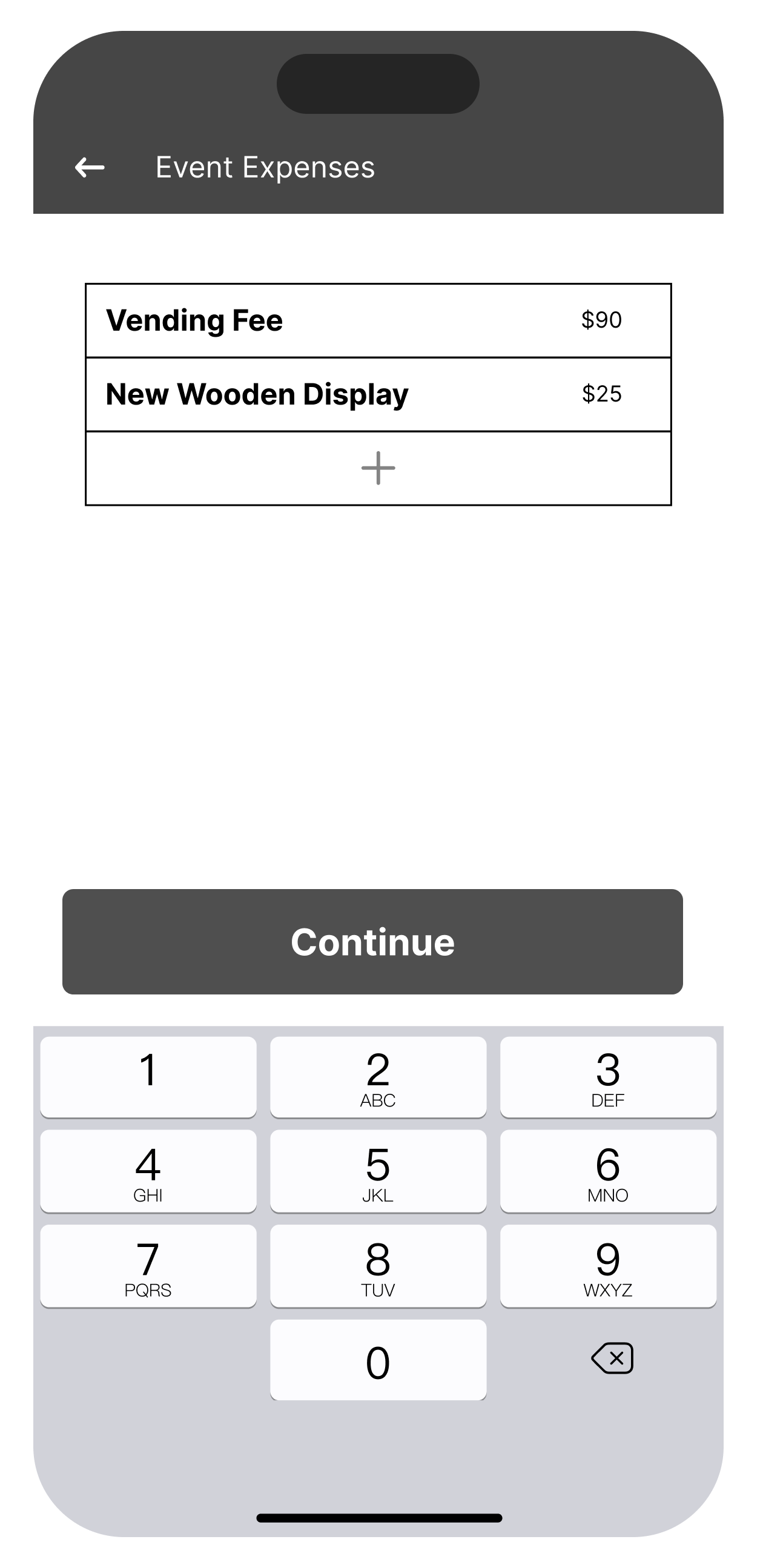
The second scenario I asked users to create an event inventory, where they would go through basically a form. That included a date picker, cost to attend, including the items and stock they were bringing, and confirmation for all the details.
There were a few things that the user had asked for such as a way to categorize and also a way to name the event as well. A few Users were unsure of the process as they were going through it and had a few questions for the pages. But it users were still able to complete the task successfully
Description
Severity Rating
3/5
Scenario
Task 2: Creating an Event Inventory
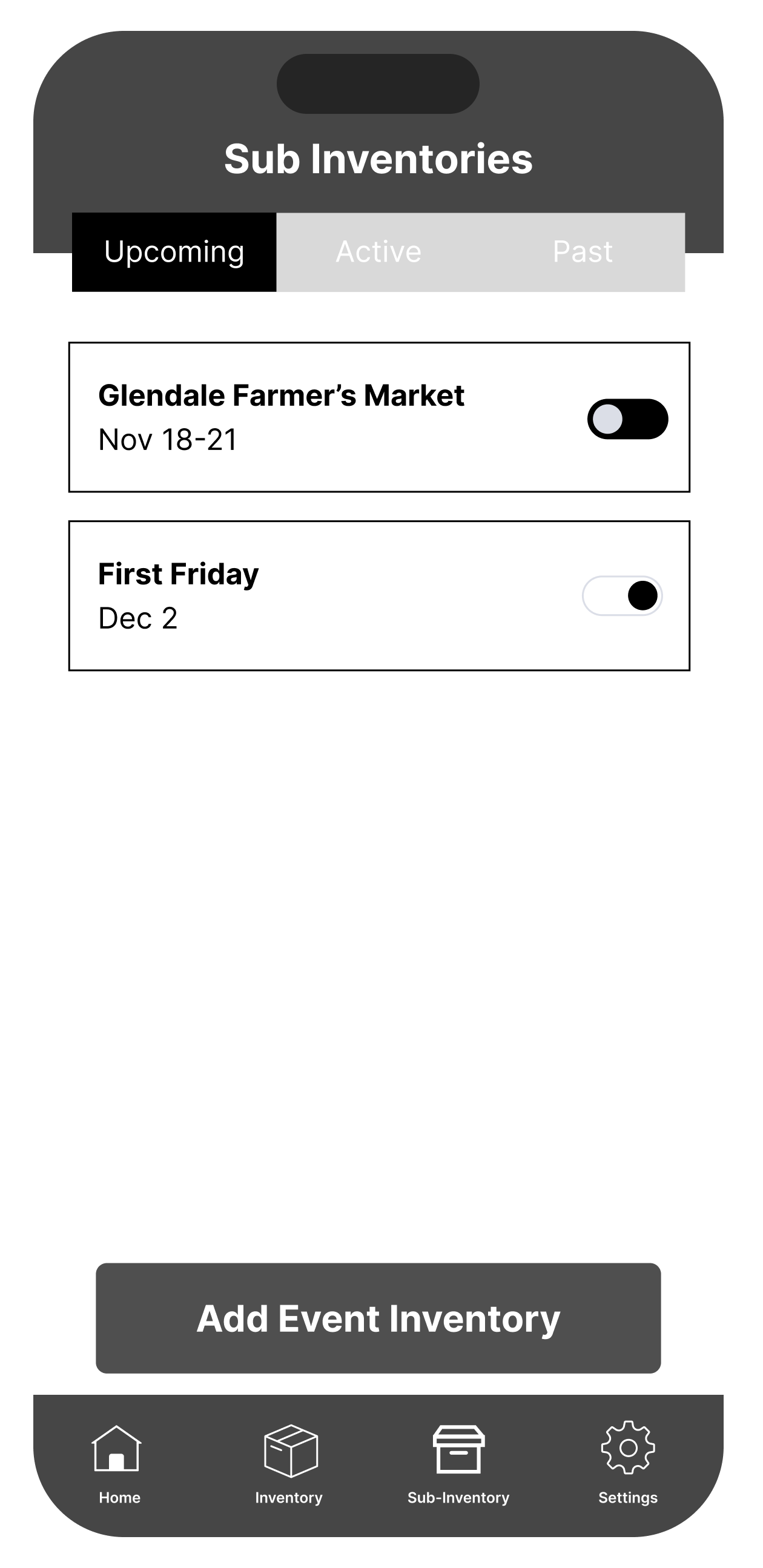
The last scenario is how the users will keep track of their sales while selling at an event.
Another simple task for users they noted that it was similar to the card payment application Square, which was the intention, so users were able to complete the task. I did make an additional way for users to add their sales after an event, but they much preferred the “active” way of inputting their sales.
Description
Severity Rating
2/5
Scenario
Task 3: Using the App While Selling In Person
Prototype
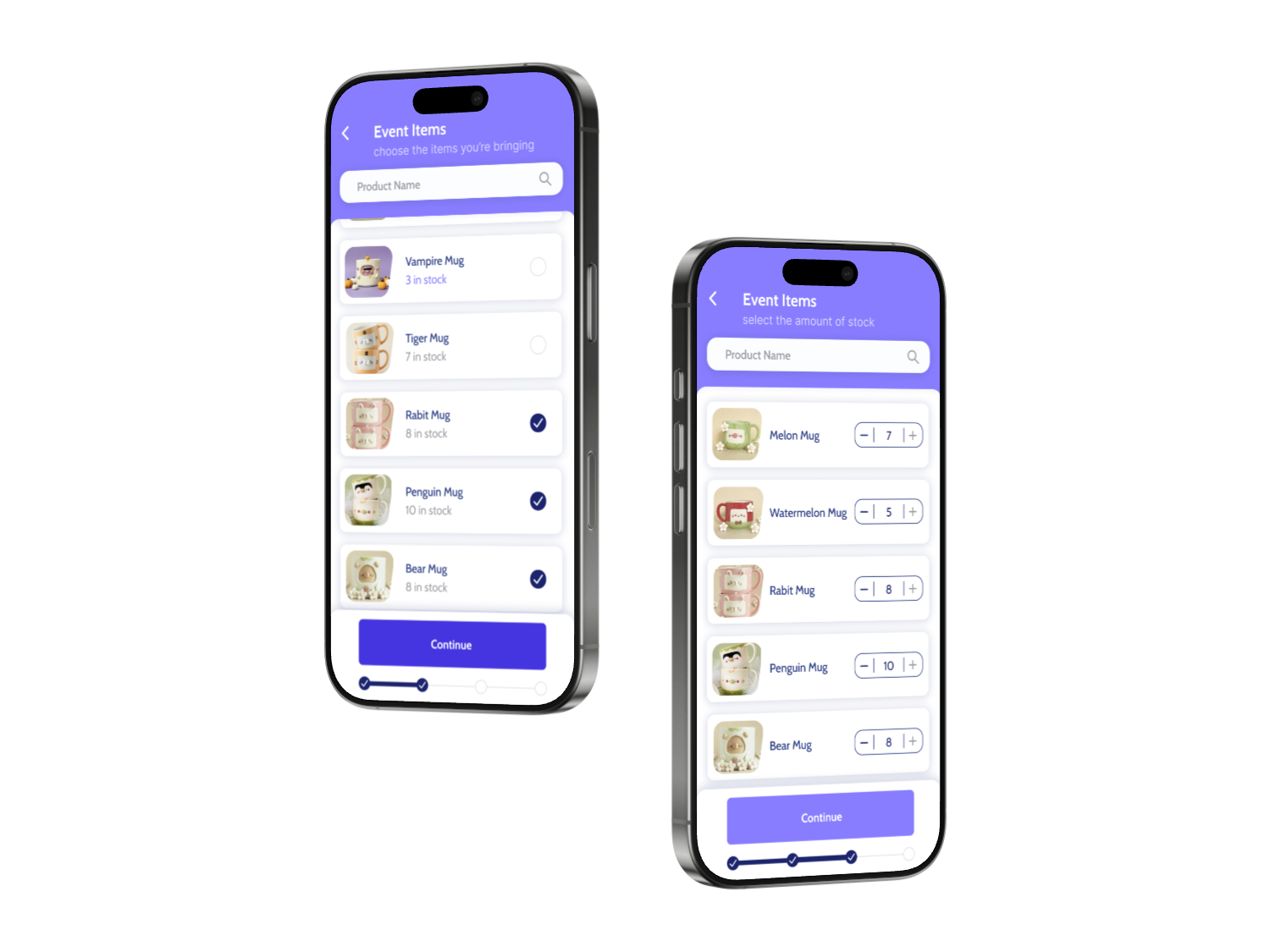
After the user testing was completed I took the feed back from my wireframes and implemented the improvements in my prototype. In this showcase you can see the user creating a new inventory to prepare for an event.
View Demers Glass
An Inventory Management App
Shopnote
ABOUT THE CLIENT
Shopnote is an application around micro business, where users have the ability to stay on top of their inventory whether they are selling in person or at an event. Users can have central inventories for all of the items and then go on to create separate inventories for each specific event or platform where users sell online that all pulls from their main inventory. The platform allows users to keep up with finances with each individual product and create financial goals through their inventories.
INDUSTRY
Retail
SERVICES
Preliminary Research
UX Designer
Asset Gathering
Keeping track of all your inventory across multiple platforms.
For micro businesses owners it can be difficult to keep track of where you’re selling what where. My goal was to simplify the chore of keeping shop owners inventory up to date.
This idea came from my own struggle
When I started my research I looked into the challenges that I and those in my own community faced. When I first started I was more so focused on how to drive sales through inventory, but realized inventory itself was an issue for micro businesses.
Digging deeper into the problem I realized
That there were a few different experiences that these business owners faced, I decided that the biggest division between the experiences came down to those who sold exclusively at in person events and those who had online shops and sold
in person.
GOAL
Improve the experience of keeping track of micro business’s inventory by making it easier to manage
Develop an essential product for mirco shop owners who both sell in person and online. The goal is to make the task of inventory keeping easier and as a way for users to see at a glance what products do well. Also creating a way for users to be able to see their expenses for their inventory and the expenses for when they sell in person.
How might we...
How might we create a more seamless experience for inventory tracking across
multiple platforms.
How might we make users feel less stressed about their finances when preparing for and event?
How might we take an analytical approach to how users sell what items in the future.
1
2
3
RESEARCH
“Is there an inventory tracking application out there that focuses around micro shop owners?”
The goal of my capstone project was to create an application that was something new. There were already a multitude of inventory application products out the, but a majority of those focused larger shops. Rather than the shop owners who were creating their own stock and having trouble keeping track of it, which was
my target.
User Type: Sells In-Person & Online


Putting together event inventory
Selling at the event
Update their website
User go through their inventory and choose what products to bring with them
Create a separate inventory list of each product they brought with them and input the inventory amounts into Square
Users will then manually go on to their selling platform they use to take away the stock they are bringing to the event or close their shop for a certain time period
It can be a lot of manual work to update stock
There are too many platforms where they need to manage they're stock
If they mess up on their digital platform they could possibly sell an item that they no longer have after selling all available stock in person
Lessen the amount of manual work
Integrate different selling platforms
Allow them to input the information during the event or afterwards, in a way that isn't as time intensive
Analyze the data from the sales day where the application can make recommendations of products to bring in the future
Create an event inventory, keep track of sales during the sales day, and at the end of the event allow the application to do all of the math for the total inventory
Biggest issue is keeping track of what sold while staying on top of sales at their table.
Users have to do a good chunk of math which can lead to human error
A lot of manual work to put in all the information
If the sale is digital they will utilize Square to take a card payment and will select Square listing to keep track of digital sales
If the payment is cash they will make a note of the total sale and what products sold
Review their sales in Square and their cash sales sheet.
Do math on their event inventory minus what had sold at the event. Then add that total back to there shop inventory
Update their website with their new inventory totals
What’s going on
Frustrations
Oppurtunities
User Type: Sells Only In-Person


Putting together event inventory
Selling at the event
Update their website
User go through their inventory and choose what products to bring with them
Create a seperate inventory list of each product they brought with them
It can be hard to keep track of where users are putting this information
There’s no centralized place for users to keep track of these lists
Lessen the amount of manual work
Allow for a centralized information hub on all of their inventory
Allow them to input the information during the event or afterwards, in a way that isn't as time intensive
Analyze the data from the sales day where the application can make recommendations of products to bring in the future
Create an event inventory, keep track of sales during the sales day, and at the end of the event allow the application to do all of the math for the total inventory
Biggest issue is keeping track of what sold while staying on top of sales at their table.
Users have to do a good chunk of math which can lead to human error
A lot of manual work to put in all the information
Users keep track of cash and digital sales by making a note of the total sale and what products sold
Review their sales in their notes, by inputing all of their information in a google sheets document
Do math on their event inventory minus what had sold at the event. Then add that total back to there shop inventory
What’s going on
Frustrations
Oppurtunities
MAIN FEATURES
& STRUCTURE
Site Map
The main focus when creating the site map was figuring out how the multiple inventories would be placed in the app and their functionality.

Onboarding
Home Page
Inventory
Sub-Inventory
Profile

Log In
Active
Add Event Inventory
Add Items
Shop Details
Manage Inventory
Settings
Sync With Main Inventory
Keep Track of Sales
Upcoming
Event Date
Edit Event
Event Expenses
Create Inventory
Event Details (location, type)
Past
Sign Up







Wireframes
In the wireframes I wanted to make sure that I was improving the experience of inventory management, I wanted to make it as painless as possible while minimizing the time the user would have to go through when keeping up with what they had
in stock.
Keep Track of Inventory
Search through products with ease
Add stock to your inventory
create new items
View how much stock you have of each item
Add new stock inventory of multiple items at once


Create Event Based Inventories
Turn on an event inventory to have it take from the main inventory
See future, present, and past events; each having different features
Include event expenses to see profit margins from
the event
Confirm the event details



Keep Track of Inventory During the Event
Users can switch between their stock and their items that have been sold
Users choose how payment was taken
Users choose the items that have been sold from previous transactions
Users can see transactions that take place during
the event


Multiple Ways to Add Stock
Add new stock inventory of for individual items
Include cost to make and price to see profit margins
Add categories to items to get a better break down
Add in a title and image for each product
Include the item in different event inventories



Task Based User Testing
When the wireframes were sufficient for testing, I found different participants that fit the criteria of my two user types and held the session over Zoom. Given the time constraints I tested 3 users, where I gave them a brief overview of the project, gave them three tasks they would have to complete, and at the end asked them for their final thoughts.
With the user feedback I was able to go back and make iterations that can be seen in the prototype.
For the first scenario users had to go through the app and find item that their shop was low in stock of and increase their inventory.
Users didn’t have a particular hard time with this task, they all succeeded. As stated before I made two ways to restock and most used the individual item option to add stock.
Description
Severity Rating
1/5
Scenario
Task 1: Restocking Inventory
The second scenario I asked users to create an event inventory, where they would go through basically a form. That included a date picker, cost to attend, including the items and stock they were bringing, and confirmation for all the details.
There were a few things that the user had asked for such as a way to categorize and also a way to name the event as well. A few Users were unsure of the process as they were going through it and had a few questions for the pages. But it users were still able to complete the task successfully
Description
Severity Rating
3/5
Scenario
Task 2: Creating an Event Inventory
The last scenario is how the users will keep track of their sales while selling at an event.
Another simple task for users they noted that it was similar to the card payment application Square, which was the intention, so users were able to complete the task. I did make an additional way for users to add their sales after an event, but they much preferred the “active” way of inputting their sales.
Description
Severity Rating
2/5
Scenario
Task 3: Using the App While Selling In Person
Prototype
After the user testing was completed I took the feed back from my wireframes and implemented the improvements in my prototype. In this showcase you can see the user creating a new inventory to prepare for an event.
View Demers Glass
LOBRIGO
Home
Design Work

About
An Inventory Management App
Shopnote
ABOUT THE CLIENT
Shopnote is an application around micro business, where users have the ability to stay on top of their inventory whether they are selling in person or at an event. Users can have central inventories for all of the items and then go on to create separate inventories for each specific event or platform where users sell online that all pulls from their main inventory. The platform allows users to keep up with finances with each individual product and create financial goals through their inventories.
INDUSTRY
Retail
SERVICES
Preliminary Research
UX Designer
Asset Gathering
Keeping track of all your inventory across multiple platforms.
For micro businesses owners it can be difficult to keep track of where you’re selling what where. My goal was to simplify the chore of keeping shop owners inventory up to date.
This idea came from my own struggle
When I started my research I looked into the challenges that I and those in my own community faced. When I first started I was more so focused on how to drive sales through inventory, but realized inventory itself was an issue for micro businesses.
Digging deeper into the problem I realized
That there were a few different experiences that these business owners faced, I decided that the biggest division between the experiences came down to those who sold exclusively at in person events and those who had online shops and sold in person.
GOAL
Improve the experience of keeping track of micro business’s inventory by making it easier to manage
Develop an essential product for mirco shop owners who both sell in person and online. The goal is to make the task of inventory keeping easier and as a way for users to see at a glance what products do well. Also creating a way for users to be able to see their expenses for their inventory and the expenses for when they sell in person.
How might we...
How might we create a more seamless experience for inventory tracking across multiple platforms.
How might we make users feel less stressed about their finances when preparing for and event?
How might we take an analytical approach to how users sell what items in the future.

1
2
3
RESEARCH
“Is there an inventory tracking application out there that focuses around micro shop owners?”
The goal of my capstone project was to create an application that was something new. There were already a multitude of inventory application products out the, but a majority of those focused larger shops. Rather than the shop owners who were creating their own stock and having trouble keeping track of it, which was my target.
User Type: Sells In-Person & Online


Putting together event inventory
Selling at the event
Update their website
User go through their inventory and choose what products to bring with them
Create a separate inventory list of each product they brought with them and input the inventory amounts into Square
Users will then manually go on to their selling platform they use to take away the stock they are bringing to the event or close their shop for a certain time period
It can be a lot of manual work to update stock
There are too many platforms where they need to manage they're stock
If they mess up on their digital platform they could possibly sell an item that they no longer have after selling all available stock in person
Lessen the amount of manual work
Integrate different selling platforms
Allow them to input the information during the event or afterwards, in a way that isn't as time intensive
Analyze the data from the sales day where the application can make recommendations of products to bring in the future
Create an event inventory, keep track of sales during the sales day, and at the end of the event allow the application to do all of the math for the total inventory
Biggest issue is keeping track of what sold while staying on top of sales at their table.
Users have to do a good chunk of math which can lead to human error
A lot of manual work to put in all the information
If the sale is digital they will utilize Square to take a card payment and will select Square listing to keep track of digital sales
If the payment is cash they will make a note of the total sale and what products sold
Review their sales in Square and their cash sales sheet.
Do math on their event inventory minus what had sold at the event. Then add that total back to there shop inventory
Update their website with their new inventory totals
What’s going on
Frustrations
Oppurtunities
User Type: Sells Only In-Person


Putting together event inventory
Selling at the event
Update their website
User go through their inventory and choose what products to bring with them
Create a seperate inventory list of each product they brought with them
It can be hard to keep track of where users are putting this information
There’s no centralized place for users to keep track of these lists
Lessen the amount of manual work
Allow for a centralized information hub on all of their inventory
Allow them to input the information during the event or afterwards, in a way that isn't as time intensive
Analyze the data from the sales day where the application can make recommendations of products to bring in the future
Create an event inventory, keep track of sales during the sales day, and at the end of the event allow the application to do all of the math for the total inventory
Biggest issue is keeping track of what sold while staying on top of sales at their table.
Users have to do a good chunk of math which can lead to human error
A lot of manual work to put in all the information
Users keep track of cash and digital sales by making a note of the total sale and what products sold
Review their sales in their notes, by inputing all of their information in a google sheets document
Do math on their event inventory minus what had sold at the event. Then add that total back to there shop inventory
What’s going on
Frustrations
Oppurtunities
MAIN FEATURES &
STRUCTURE
Site Map
The main focus when creating the site map was figuring out how the multiple inventories would be placed in the app and their functionality.

Onboarding
Home Page
Inventory
Sub-Inventory
Profile

Log In
Active
Add Event Inventory
Add Items
Shop Details
Manage Inventory
Settings
Sync With Main Inventory
Keep Track of Sales
Upcoming
Event Date
Edit Event
Event Expenses
Create Inventory
Event Details (location, type)
Past
Sign Up







Wireframes
In the wireframes I wanted to make sure that I was improving the experience of inventory management, I wanted to make it as painless as possible while minimizing the time the user would have to go through when keeping up with what they had in stock.
Keep Track of Inventory
Search through products with ease
Add stock to your inventory
create new items
View how much stock you have of each item
Add new stock inventory of multiple items at once


Create Event Based Inventories
Turn on an event inventory to have it take from the main inventory
See future, present, and past events; each having different features
Include event expenses to see profit margins from
the event
Confirm the event details



Keep Track of Inventory During the Event
Users can switch between their stock and their items that have been sold
Users choose how payment was taken
Users choose the items that have been sold from previous transactions
Users can see transactions that take place during
the event


Multiple Ways to Add Stock
Add new stock inventory of for individual items
Include cost to make and price to see profit margins
Add categories to items to get a better break down
Add in a title and image for each product
Include the item in different event inventories



Task Based User Testing
When the wireframes were sufficient for testing, I found different participants that fit the criteria of my two user types and held the session over Zoom. Given the time constraints I tested 3 users, where I gave them a brief overview of the project, gave them three tasks they would have to complete, and at the end asked them for their final thoughts.
With the user feedback I was able to go back and make iterations that can be seen in
the prototype.
For the first scenario users had to go through the app and find item that their shop was low in stock of and increase their inventory.
Users didn’t have a particular hard time with this task, they all succeeded. As stated before I made two ways to restock and most used the individual item option to add stock.
Description
Severity Rating
1/5
Scenario
Task 1: Restocking Inventory
The second scenario I asked users to create an event inventory, where they would go through basically a form. That included a date picker, cost to attend, including the items and stock they were bringing, and confirmation for all the details.
There were a few things that the user had asked for such as a way to categorize and also a way to name the event as well. A few Users were unsure of the process as they were going through it and had a few questions for the pages. But it users were still able to complete the task successfully
Description
Severity Rating
3/5
Scenario
Task 2: Creating an Event Inventory
The last scenario is how the users will keep track of their sales while selling at an event.
Another simple task for users they noted that it was similar to the card payment application Square, which was the intention, so users were able to complete the task. I did make an additional way for users to add their sales after an event, but they much preferred the “active” way of inputting their sales.
Description
Severity Rating
2/5
Scenario
Task 3: Using the App While Selling In Person
Prototype
After the user testing was completed I took the feed back from my wireframes and implemented the improvements in my prototype. In this showcase you can see the user creating a new inventory to prepare for an event.
View Demers Glass
Lobrigo
Descriptive line about what your company does.
